Home

Google Chrome Browser

making the web faster, safer, and easier

Main menu

  • Home
  • Chromebook
  • Chrome OS
  • Android
  • Books
  • Releases
    • Stable
    • Beta channel
    • Dev channel
  • Downloads
  • Videos
    • Top Rated
    • Most Viewed
    • Most Commented
  • Articles
    • Top Rated
    • Most Viewed
    • Most Commented
  • About Us
Home

Add to Technorati Favorites

Subscribe to Google Chrome Browser by e-mail

Delivered by FeedBurner

Syndicate

Syndicate content

User login

Login/Register
What is OpenID?
  • Log in using OpenID
  • Cancel OpenID login
  • Create new account
  • Request new password

Tag Cloud

Beta updates browser browsers browsing chrome chromebook chrome extensions Chrome OS chromium Dev updates Downloads extensions feed Firefox Google googlechrome google chrome Internet Explorer Linux open source opera release security Stable updates TC video web web browser web browsers windows
more tags

Twitter Updates

Follow us on Twitter @ChromeBrowser


    security

    This File Appears To Be Malicious, Google Chrome Safe Browsing Protection

    Submitted by admin on Wed, 04/06/2011 - 04:35
    • browsing
    • google chrome
    • malicious
    • safe browsing
    • security

    Chrome users on the developer channel or Canary will see download warnings if they try to download a file on a website that matches the list of malicious websites published by Google’s Safe Browsing Api. The warning reads “This file appears to be malicious. Are you sure you want to continue” with options to discard and save. The options may cause quite the confusion among users, and it would probably have been better if Google would have simply added Yes and No buttons to the prompt

    Another thing to remember is that all downloads of said websites will be flagged, regardless whether they are indeed malicious or dangerous in nature, or not. All downloads? Well that is not entirely right, at least not for now. Google flags all Windows executable downloads as suspicious if the site is on the Safe Browsing list. No warning is currently displayed for other files. These files are not actually scanned by Google, keep that in mind if the warning message pops up.

    this file appears to be malicious

    • Add new comment
    • Read more
    • 514 reads
    • Feed: gHacks technology news
    • Original article

    Google Chrome and Chromium add protection against malicious downloads

    Submitted by admin on Tue, 04/05/2011 - 15:00
    • Apps
    • browser
    • browsers
    • chrome
    • chromium
    • download
    • google chrome
    • googlechrome
    • malicious
    • protection
    • safe browsing
    • SafeBrowsing
    • security
    • web
    google chrome malicious download

    Google Chrome already sports a number of security-minded features, from Incognito mode to a software sandbox which makes exploiting the browser a Herculean task. Now, Google has announced additional protection for Chromium and Chrome users.

    Built upon the Safe Browsing API, the new feature introduces protection against malicious downloads. If a download link appears in the Safe Browsing blacklist, Chrome and Chromium will warn users against downloading -- a save button is still presented, of course, in case you're convinced a file is perfectly safe to download.

    We'd like to see something a bit more eye-catching than the red warning icon -- like perhaps painting the entire bar red. Many of the people a feature like this aims to protect probably won't notice the icon or change in wording as they'll be focused on clicking the save button.

    Google is initially making download protection available to Chrome dev channel users, and you'll likely see it in Canary and Chromium snapshot builds as well. After thorough testing, beta and stable users will be next in line.

    • Add new comment
    • Read more
    • 991 reads
    • Feed: Download Squad
    • Original article

    Internet Explorer and Safari first to fall at Pwn2Own 2011, Chrome and Firefox still standing

    Submitted by admin on Thu, 03/10/2011 - 10:15
    • apple
    • browsers
    • chrome
    • compromised
    • Firefox
    • Firefox3.6
    • Google
    • google chrome
    • googlechrome
    • Internet Explorer
    • InternetExplorer8
    • Microsoft
    • mozilla
    • pwn2own
    • safari
    • safari 5
    • Safari5
    • security
    • vulnerability
    • web
    Pwn2Own Firefox and Chrome still standing

    Pwn2Own, the annual three-day browser hackathon, has already claimed its first two victims: IE8 on Windows 7 64-bit, and Safari 5 on Mac OS X. Google Chrome looks set to survive for its third year in a row.

    Internet Explorer 8 was thoroughly destroyed by independent researcher Stephen Fewer. "He used three vulnerabilities to bypass ASLR and DEP, but also escape Protected Mode. That's something we've not seen at Pwn2Own before," said Aaron Portnoy, the organizer of Pwn2Own.

    Safari 5, running on a MacBook Air, was compromised in just five seconds by French security company Vupen. Both attackers netted $15,000 for successfully compromising a browser.

    The contest continues today and tomorrow. Firefox 3.6 is yet to be attacked, and tomorrow will see the very first mobile browser deathmatch. Windows Phone 7, iOS, Android and RIM OS, all with their stock browsers, will be attacked by security researchers to find out just how secure mobile browsing is. Again, $15,000 is available for the first person or team to compromise each of the browsers.

    Google, Apple and Mozilla, incidentally, all rolled out updates to their browsers just before Pwn2Own. It was not a coincidence.

    • Add new comment
    • Read more
    • 1847 reads
    • Feed: Download Squad
    • Original article

    A Mini-Newsletter From Your Google Chrome Security Team

    Submitted by admin on Tue, 03/08/2011 - 20:51
    • chromium
    • feed
    • google chrome
    • googlechrome
    • security
    We’re always working hard to enhance the Chrome browser with bug fixes, new defenses and new features. The release of Chrome 10 is no different, and there are some items worth highlighting:
     
    Chrome 10: Flash sandboxing
    With Chrome 10, our first cut of the previously announced Flash sandboxing initiative is now enabled by default for the Windows platform on Vista and newer. Additionally, because we automatically update Flash to the latest and most secure version, this should provide useful defense in depth.
     
    Chrome 10: Out-of-date plug-in warnings
    As we previously mentioned, we believe that some of the most significant opportunities to increase user security revolve around plugins. We’ve made a number of improvements in this area, including actively encouraging users to update their plug-ins to the most secure version. Chrome now detects when a plug-in is out of date and blocks it with a simple infobar. This infobar helps guide the user towards updating their plug-in with the latest security fixes.
     
     
    Chrome 10: Plug-in blocking enhancements
    Some of our more advanced users prefer fine-grained control over which plug-ins they wish to run -- which can have security and privacy benefits. Chrome has long had a feature which blocks plug-ins by default (Wrench menu -> Preferences -> Under the hood -> Content Settings -> Plug-ins). We’ve improved this feature by adding a context menu to the blocked plug-in placeholder. This menu lets users control which plug-ins do and do not run. Using a context menu helps prevent clickjacking attacks that try to bypass the block. Plug-in placeholders can also be hidden (for example, if they are floating over and obscuring real content), and the actual plug-in that wishes to run is made apparent.
     
    Chromium Security Rewards program still going strong
    We mentioned in passing in the 9.0.597.107 release notes that our rewards program has passed $100,000 of rewards. We’d like to re-iterate our thanks to all the named researchers in our Hall of Fame. We’re continually delighted with the stream of interesting and clever bugs that we receive, so it will be exciting to see what the rest of 2011 brings. Remember, we love giving out money!
     
    Still hiring!
    We are always looking to expand the Google Chrome Security Team, and we’re looking for a wide range of talents. We can promise exciting and varied work, working to protect hundreds of millions of users and working alongside the best in the industry. Why not have a look at our job posting?
     
    • Add new comment
    • Read more
    • 1030 reads
    • Feed: Chromium Blog
    • Original article

    BufferZone Pro sandboxing software now a totally free download

    Submitted by admin on Wed, 02/23/2011 - 14:00
    • Apps
    • bufferzone
    • bufferzone pro
    • BufferzonePro
    • Freeware
    • pro
    • sandbox
    • sandboxing
    • security
    • trustware
    • windows
    trustware bufferzone pro free download

    Trustware's BufferZone was an early entrant into the desktop sandboxing arena. Sandboxing, of course, is the security-by-isolation system which has since been built into apps like Google Chrome and Adobe Reader X. Recently, Trustware launched a promotion and gave away BufferZone Pro for free -- and now the company is making the discount permanent. From now on, BufferZone Pro will be freeware.

    But, wait -- BufferZone still doesn't support x64, and maybe you're thinking that there will be a paid version once a 64-bit Windows version arrives. Not so, Trustware's Efrat Schneider told me in an email: "The product will continue to be free," he replied.

    If you're looking for a free way to tighten up security on your Windows system, BufferZone is an excellent app for the job. We'll let you know when the 64-bit version becomes available.

    • Add new comment
    • Read more
    • 1209 reads
    • Feed: Download Squad
    • Original article

    Disable or Restrict Plug-Ins in Chrome to Prevent Malware Installs

    Submitted by admin on Fri, 02/11/2011 - 07:00
    • Annoyances
    • chrome
    • feed
    • google chrome
    • Java
    • plug-in
    • security

    Plug-ins can open vulnerabilities in even relatively secure browsers like Chrome. Even coders, like Jeff Atwood, can fall victim. Here's how to reign in plug-ins like Java, or disable them entirely, in Google Chrome. More »

    • Add new comment
    • 767 reads
    • Feed: Lifehacker: Google Chrome
    • Original article

    Chromium to Feature in Pwn2Own Contest!

    Submitted by admin on Mon, 02/07/2011 - 13:30
    • chromium
    • feed
    • google chrome
    • googlechrome
    • security
    We’re excited that the Google Chrome browser will feature in this year’s Pwn2Own contest. Chrome wasn’t originally going to be included as a target browser in the competition, but Google volunteered to sponsor Chrome’s participation by contributing monetary rewards for Chrome exploits. For the past year we’ve enjoyed working with the security community and rewarding researchers for high quality work through our Chromium Security Reward program. Sponsoring this contest to discover more bugs was a logical step. We thought we’d answer some frequently asked questions in the form of a Q&A session:
     
    Q) Is Chrome OS a target?
    A) No, not this year, as Chrome OS is still in beta. Per HP TippingPoint / ZDI guidelines, the actual target will be the latest stable version of the Chrome browser at the time, running on an up-to-date Windows 7 system. A Chrome OS device will, however, be awarded in addition to the prize money.
     
    Q) Are you betting that Chrome can’t be hacked?
    A) No. We think the Chrome browser has a strong security architecture, and Chrome has fared well in past years at Pwn2Own. But we know that web browsers from all vendors are very large pieces of software that invariably do have some bugs and complex external dependencies. That’s why the Chromium Security Reward program exists, along with our newer web application reward program. As a team comprised largely of security researchers, we think it’s important to reward the security community for their work which helps us learn. Naturally, we’ll learn the most from real examples of Chrome exploits.
     
    Q) How do the rules work?
    A) We worked with ZDI to come up with a rules structure that would reward exploits in code specific to Chromium and in third-party components such as the kernel or device drivers.
     
    Of course, we prefer to pay rewards for bugs in our own code because we learn more and can make fixes directly. On day 1 of the competition, Google will sponsor $20,000 for a working exploit in Chrome, if it uses only Chrome bugs to compromise the browser and escape the sandbox. Days 2 and 3 will also allow for bugs in the kernel, device drivers, system libraries, etc., and the $20,000 prize will be sponsored at $10,000 by Google and $10,000 by ZDI to reflect the occurrence of the exploit partially outside of the Chrome code itself.
     
    Note that ZDI is responsible for the rules and may change them at their own discretion.
     
    Q) Does this competition impact the Chromium Security Reward program?
    A) The program still pays up to $3,133.7 per bug. As always, submissions to the program don’t require exploits in order to be rewarded. In addition, we continue to reward classes of bugs (such as cross-origin leaks) that would otherwise not be eligible for prizes at Pwn2Own. We encourage researchers to continue submitting their bugs through the Chromium Security Reward program.
     
    • Add new comment
    • Read more
    • 545 reads
    • Feed: Chromium Blog
    • Original article

    Google offers $20,000 for successful Chrome hack at Pwn2Own 2011

    Submitted by admin on Thu, 02/03/2011 - 08:00
    • chrome
    • Chrome OS
    • chromeos
    • cr-48
    • cr48
    • cros
    • Google
    • google chrome
    • googlechrome
    • pwn2own
    • pwn2own+2011
    • pwn2own2011
    • security

    Google isn't just bringing the Chrome Browser to Pwn2Own 2011 -- this time, it's also bringing its own hardware. The Cr-48 Chrome OS laptop will be on hand for the browser exploiting hullabaloo, and Google is offering $20,000 and a CR-48 notebook for a successful exploit. According to the event's organizer, the attacker will also need to escape Chrome's sandbox. At last year's event, prominent researcher Charlie Miller said that's no easy task, so we're very curious to see whether someone will succeed this time around.

    Offering cash for exposing vulnerabilities isn't anything new for Google, of course. The Big G just paid one developer $7,500 for finding a trio of vulnerabilities in Chrome back in January.

    • Add new comment
    • Read more
    • 848 reads
    • Feed: Download Squad
    • Original article

    Reveal Passwords Bookmarklet Ensures You'll Never Get Locked Out of Your Accounts

    Submitted by admin on Wed, 02/02/2011 - 08:30
    • Bookmarklets
    • chrome
    • feed
    • Firefox
    • google chrome
    • Internet Explorer
    • opera
    • Passwords
    • safari
    • security
    • web browsers

    We've long been advocates of random password generators and autofillers like LastPass, but using them means you probably don't remember your passwords by heart. This handy bookmarklet will reveal your autofilled passwords for you, replacing the cryptic dots for that session. More »

    • Add new comment
    • 333 reads
    • Feed: Lifehacker: Google Chrome
    • Original article

    Google Chrome Dev Channel Gets Password Syncing

    Submitted by admin on Tue, 02/01/2011 - 16:05
    • autofill
    • browsers
    • chrome
    • feed
    • google chrome
    • Passwords
    • security
    • synchronization
    • Syncing
    • web browsers
    • Add new comment
    • Read more
    • 360 reads
    • Feed: Lifehacker: Google Chrome
    • Original article

    Why Does Chrome Think Gmail Is Insecure?

    Submitted by admin on Wed, 01/26/2011 - 14:30
    • Ask Lifehacker
    • chrome
    • Explainer
    • feed
    • Gmail
    • Google
    • google chrome
    • https
    • privacy
    • public wi-fi
    • security
    • Web Browsing
    • Wi-Fi

    Dear Lifehacker,
    Google Chrome's security padlock is freaking me out. When I'm on sites that should be secure—like, say, Gmail—Chrome is giving me warnings that the page isn't secure. What's going on here? More »

    • Add new comment
    • 360 reads
    • Feed: Lifehacker: Google Chrome
    • Original article

    Flash sandboxing arrives in Chrome Dev Channel for Windows

    Submitted by admin on Thu, 12/02/2010 - 04:20
    • Adobe
    • Apps
    • browser
    • browsers
    • chrome
    • Flash
    • Google
    • google chrome
    • googlechrome
    • security
    • windows
    Google Chrome Flash sandbox

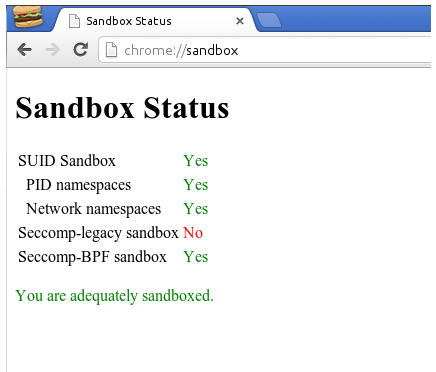
    Sandboxing, the process of isolation and containment of untrusted executable code, is an important tool in securing your browser, and thus your computer, against unruly malware. Google Chrome has been sandboxing HTML rendering and JavaScript execution for a while, but now they've followed through on their promise and brought sandboxing to the Flash plug-in. Not only can Chrome sandbox the built-in Flash plug-in, but also the standalone Adobe version too -- so no matter whether you're running the latest Flash beta, or the automatically-updated Chrome one, you can browse a little bit safer.

    Sandboxing in Chrome is currently only available for Windows, where it's particularly important for the relatively insecure Windows XP, and is rolling out to all Chrome Dev installations on Windows automatically. If you have a particular aversion to sandboxing your Flash experience, you can easily disable it with the flag --disable-flash-sandbox. For those of you who are running the beta or stable release of Chrome, but want to try out the developer version with Flash sandboxing for Windows, then head on over to Chromium.org and grab yourself the 'Dev channel' and install it over the top of your current Chrome version.

    • Add new comment
    • Read more
    • 686 reads
    • Feed: Download Squad
    • Original article

    Google Chrome Brings in Sandbox for Adobe Flash Content

    Submitted by admin on Thu, 12/02/2010 - 00:21
    • feed
    • google chrome
    • Internet Browsers
    • sandbox
    • security


    Over time, Google Chrome has achieved a reputation for being one of the fastest and most secure browsers. Chrome attributes much of it’s security due to the sandboxing model, which ensures that each tab runs in a separate process and cannot interfere with each other.

    Google Chrome Sandbox

    Google Chrome has gone the extra step to ensure that one of the most vulnerable software, Adobe Flash, gets constantly updated with bundling and auto-updating the Flash Player automatically. Extending this further, with the latest dev channel editions, Chrome also sandboxes Adobe Flash content. Chrome developers state that Chrome is the first browser under Windows XP which sandboxes Adobe Flash content and hopes this will protect users again most common malware.

    For whatever reason, if you want to disable Flash sandboxing, add –disable-flash-sandbox as a command line parameter to your Chrome shortcut and you’re set.

    • Add new comment
    • Read more
    • 759 reads
    • Feed: Techie Buzz
    • Original article

    Avoid the "This Type of File Can Harm Your Computer" Message in Chrome

    Submitted by admin on Wed, 12/01/2010 - 15:30
    • Annoyances
    • chrome
    • Downloading
    • feed
    • google chrome
    • security

    Every time you try to download an application in Google Chrome, it gives you an annoying prompt at the bottom of your browser asking if you are sure. You can't disable this message outright, but you can make your downloading more keyboard-friendly. More »

    • Add new comment
    • 956 reads
    • Feed: Lifehacker: Google Chrome
    • Original article

    Good News: Chrome Now Sandboxes Flash for More Secure Browsing [Security]

    Submitted by admin on Wed, 12/01/2010 - 14:25
    • chrome
    • Downloads
    • Fb
    • feed
    • Flash
    • google chrome
    • security
    • Updates
    • web browsers
    • windows
    <!-- div style="background-color: #B3B3B3; width: 160px; padding: 1px;">#security

    Click here to read Good News: Chrome Now Sandboxes Flash for More Secure Browsing

    Adobe Flash Player is now sandboxed in the latest dev channel release of Google Chrome, bringing a huge security benefit to Chrome users.

    • Add new comment
    • Read more
    • 272 reads
    • Feed: Lifehacker: Google Chrome
    • Original article

    Vanilla Whitelists Your Cookies in Google Chrome

    Submitted by admin on Fri, 11/19/2010 - 14:30
    • Add ons
    • browser extensions
    • chrome
    • Downloads
    • feed
    • google chrome
    • privacy
    • security

    Chrome: Vanilla is a browser extension that serves as a whitelist for browser cookies, automatically blocking cookies from sites you don't explicitly allow. More »

    • Add new comment
    • 867 reads
    • Feed: Lifehacker: Google Chrome
    • Original article

    Internet Explorer is Safer than Google Chrome and Firefox

    Submitted by admin on Wed, 11/17/2010 - 11:57
    • chrome
    • Firefox
    • Google
    • google chrome
    • ie
    • Internet Explorer
    • opera
    • safari
    • security
    • web browser
    • web browsers

    Internet Explorer is Safer than Google Chrome and Firefox

    Or so it seems.

    According to the “Dirty Dozen” applications list (which is basically a collection/report of the most discovered software flaws that require security updates), when it comes to vulnerabilities, Google Chrome is the no. 1 application to get.

    Furthermore, same report claims that Internet Explorer has far less security flaws than Safari or Firefox web browsers.

    Good news for Opera users, as this browser had the lowest number of discovered vulnerabilities.

    Statistics (application, number of security flaws found)

    • Add new comment
    • Read more
    • 1008 reads
    • Feed: Web Browsers News and Reviews
    • Original article

    Google Chrome sandboxes Flash for more secure browsing

    Submitted by admin on Mon, 11/15/2010 - 07:17
    • Adobe
    • chrome
    • Flash
    • Google
    • google chrome
    • googlechrome
    • sandbox
    • sandboxing
    • security


    google chrome flash sandbox

    Adobe Flash remains a popular attack vector for malware authors. In addition to a seemingly never-ending supply of security flaws, bad guys know that people who use Flash often ignore the updater's prompts. That leaves users in an even more tenuous position, since they're still vulnerable to attacks Adobe has already patched.

    That's one big advantage to Google Chrome's internal Flash plug-in. Since updates are delivered silently in the background to users, the internal plug-in is always up-to-date. This keeps everyone as safe as possible, but Chrome offers one more way to protect its users: sandboxing. By running unfamiliar Web code in its isolated sandbox, Chrome can execute that code in a safe environment -- where it can't harm your operating system.

    Back when Google first announced internal Flash, one of their stated goals was "to further protect users by extending Chrome's 'sandbox' to web pages with Flash content." According to revision 66022, Google is making good on their promise. Sandboxed Flash is now supported in the Chromium source code, and should be available to Windows users of Canary and Chrome Dev very soon. A quick look through the source code seems to indicate that Chrome can sandbox not only its own internal Flash plug-in, but also the traditional Adobe version -- as long as it's version 10.1.103.19 or better.

    This is great news for Chrome users. It was already an incredibly difficult browser to exploit, and sandboxing Flash will add another layer of armor to its defenses.

    • Add new comment
    • Read more
    • 991 reads
    • Feed: Download Squad
    • Original article

    BitDefender safego protects you from Facebook dangers

    Submitted by admin on Wed, 10/27/2010 - 09:00
    • antivirus
    • bitdefender
    • danger
    • malware
    • phishing
    • safego
    • security
    • trojan
    • virus

    Facebook's immense popularity has made it a prime target for cybercriminals. Malicious (or 'poisoned') links, spam, and malvertising are all too common -- and it's far too easy for an unsuspecting Facebook user to be taken in. Hey, if one of your friends sends you a link to what seems like a hilarious picture, there's a decent chance you'll click through, right?

    ... And that's how the bad guys get you. Fortunately, however, there's a slick new Facebook app from BitDefender called safego that can help protect you (and your less-technical friends and family).

    The idea is simple: install safego and let it scan your profile. Any links you've received will be scanned, including short URLs from services like bit.ly and tinyurl. Fire up the scanner and let it check all those new messages and wall posts you've received, and you'll know in an instant if there's anything that you should avoid clicking.

    My mind boggles when I think about all of the infected computers I've cleaned that could have been spared that fate if their owners had used an app like safego to defend their Facebook profiles.
    safego even checks your account for any privacy issues which might need to be addressed. Right now, unfortunately, attention items aren't linked -- so I can't find out what it is about my profile safego thinks I should check.

    The app is in beta, however, so I'd fully expect that problem to be addressed by the time it sheds the tag. It's also worth noting that on some versions of Google Chrome the bottom boxes in safego's dashboard (last scanned items and infected items) never update. Again, this is likely a beta issue.

    Growing pains aside, BitDefender safego is still a fantastic way for any Facebook user to protect him or herself. If you've ever been the victim of a malicious link on Facebook or had your profile attacked by some nasty malware, safego is an app you simple shouldn't be without.

    BitDefender provides safego totally free, and with good reason. The Facebook app is a great idea, and it's got tremendous viral potential. That means a lot of free PR and more name recognition for BitDefender -- which in turn could lead to increased sales of the company's paid products.

    It should also allow BitDefender greater insight into the Facebook threat landscape, and that's a good thing for all of us. The more security companies know about what the bad guys are up to on Facebook, the better equipped they'll be to protect us.

    Install the BitDefender safego Facebook app

    • Add new comment
    • Read more
    • 447 reads
    • Feed: Download Squad
    • Original article

    Google Chrome's sync can now be secured with a passphrase

    Submitted by admin on Thu, 10/14/2010 - 04:37
    • cloud
    • Google
    • google chrome
    • googlechrome
    • security

    Google Chrome sync passphraseIf you believe that Google might look at your passwords and the other data you send through Chrome's integrated sync, worry no more. Starting now, you can use a password for increased sync security.

    The passphrase option is currently only available in Chrome's Dev Channel, but these things usually trickle down to the Beta and Stable channels pretty quickly. You can find it in Options > Personal Stuff > Sync > Customize > Encryption tab. Once you set up your passphrase, you won't be able to sync any data to another Chrome install without entering it there as well. Also, Google won't be able to see any of your synced data, since it will be stored encrypted on their servers, and your passphrase itself never leaves your computer(s). One thing to keep in mind is that once you've set a passphrase, you can't remove it without clearing your sync data.

    This is a neat addition to the sync feature, yet for complete peace of mind when passwords are involved, a dedicated tool like LastPass will probably work better. Granted, that does require an additional download and setup routine, and some simply won't go through that trouble -- so it's definitely cool that even integrated features receive additional security.

    • Add new comment
    • Read more
    • 1519 reads
    • Feed: Download Squad
    • Original article
    • « first
    • ‹ previous
    • 1
    • 2
    • 3
    • 4
    • 5
    • 6
    • next ›
    • last »

    Google Chrome Browser is a community site for users and developers of the Google Chrome browser.
    Google™ is a Trademark of Google Inc. All other company and product names may be trademarks of the respective companies with which they are associated.
    Google Chrome Browser site is not affiliated with or sponsored by Google Inc.
    Google Chrome Browser site is built on the Drupal open source content management system.