
web browsers
Google Chrome & Firefox Have More Vulnerabilities Than Flash And Java Combined
Time to go back to IE? Now here is something you won’t hear that often. Despite the common hate for Adobe’s Flash and Oracle’s Java plugins, it looks like they are not the major offenders when it comes to the actual number of vulnerabilities. According to the latest report by security firm Secunia, Google Chrome, [...]
- Add new comment
- 999 reads
- Feed: Web Browsers News and Reviews
February, 2013 Desktop Market Share: Internet Explorer, Firefox, Safari, Opera Up; Google Chrome Down
If yesterday’s mobile browsers data is not exactly your cup of tea then we have another solution for you and it’s all about the desktop. As you might have guessed from the title, February was a pretty interesting month indeed. Starting off with Internet Explorer, Microsoft’s web browser continues to rebound its losses, up from [...]
- Add new comment
- 744 reads
- Feed: Web Browsers News and Reviews
January, 2013 Mobile Market Share: Safari, Google Chrome, Internet Explorer – Up; Opera Mini, Android – Down
As the “New Year” passes by, it’s time to take a look at the mobile market share data for January, 2013, which includes one new player: Internet Explorer.
- Add new comment
- Read more
- 3382 reads
- Feed: Web Browsers News and Reviews
December, 2012 Desktop Market Share: Internet Explorer, Google Chrome, Opera - Up; Firefox, Safari - Down
When you look back, in 2011 a lot of people thought that Internet Explorer was pretty much doomed and that Google Chrome and Firefox will dominate the desktop space for an indefinite amount of time. Well, look how things have change… or did they? Steady as she goes, Internet Explorer is up again, from 54.76% [...]
- Add new comment
- 858 reads
- Feed: Web Browsers News and Reviews
Mobile Browser Benchmarks: Android Browser 4.1 vs. Google Chrome 18 vs. Dolphin 9 vs. Firefox 17 vs. Maxthon 1.7 vs. Opera Mobile 12.1 vs. Sleipnir 2.5
Now here is something for the Android users. Guys from TomsHardware took massive list of Android 4.1 (Jellybean) supported web browsers and tested all of them. If you got confused by too many alternatives, this article should give you a pretty good indicator on who’s leading and who’s lagging in this area. You will be [...]
- Add new comment
- 3887 reads
- Feed: Web Browsers News and Reviews
November, 2012 Desktop Market Share: Internet Explorer, Firefox, Safari, Opera - Up; Google Chrome - Down
It’s the last month of the year as we check the market share results for November. Were there any surprises? Let’s find out. It looks like Internet Explorer wont slide below the 50% mark for quite some time as its market share continues to edge higher, up from 54.13% to 54.76% (0.63 point increase). Mozilla’s [...]
- Add new comment
- 1108 reads
- Feed: Web Browsers News and Reviews
Windows 8 Benchmarks: IE10 vs. Firefox 16 vs. Google Chrome 23 vs. Opera 12.1
With Microsoft publishing a developer preview version of Windows 8 back in 2011, it’s time to find out, which (if any) of the web browser companies actually did their homework and optimized the software for the latest OS. Web Browsers Internet Explorer 10 Firefox 16 Google Chrome 23 Opera 12.10 Benchmark Results Conclusion Overall, a [...]
- Add new comment
- 551 reads
- Feed: Web Browsers News and Reviews
Concept: Google Chrome For Windows Phone 8
Opera Mobile concept coming up next week. With the approaching launch of Windows 8 and Windows Phone 8, it appears that some Google Chrome fans have decided to create a mockup on how the favorite web browser would look like running on a WP8 hardware. The result? See the pictures below. For even more pictures, [...]
- Add new comment
- 4020 reads
- Feed: Web Browsers News and Reviews
September, 2012 Desktop Market Share: Internet Explorer, Firefox, Safari, Opera - Up; Google Chrome - Down
After publishing the market share report for the mobile web browsers, it’s time to reveal a real thing: desktop. As we are weeks before the launch of the Windows 8, Microsoft’s Internet Explorer managed to increase its market share by 0.03 point, up from 53.60% to 53.63%. Just like IE, Mozilla’s Firefox has also increased [...]
- Add new comment
- 824 reads
- Feed: Web Browsers News and Reviews
Google Chrome Receives The “DNT” Feature
Following the competitors, Google has finally started implementing a much requested and widely anticipated, “Do Not Track” feature. According to one of the Google’s spokesmen, the search giant has “undertook to honor an agreement on DNT that the industry reached with the White House early this year. To that end we’re making this setting visible [...]
- Add new comment
- 3837 reads
- Feed: Web Browsers News and Reviews
August, 2012 Desktop Market Share: Google Chrome, Safari – Up; Internet Explorer, Firefox, Opera – Down
As the summer passes by, it’s time to find out, how exactly did your favorite web browser perform in the month of August. Starting with the Internet Explorer, we resume the long and unsurprising downtrend, down from 53.93% to 53.60% (0.33 point decrease). After a couple of good months, Firefox too continues its downtrend, down [...]
- Add new comment
- 786 reads
- Feed: Web Browsers News and Reviews
Internet Explorer 10 (IE10) vs. Firefox 15, 14 vs. Google Chrome 23 vs. Opera 12.5
As we have reported earlier, Google has decided to create a yet another JavaScript benchmark and after publishing some preliminary browser results from other sources, we have decided to do a test of our own. Web Browsers Internet Explorer 10 Release Preview (Build 10.0.8400.0) Firefox 14 (Version 14.0.1) Firefox 15 Beta 5 Google Chrome 23 [...]
- Add new comment
- 1479 reads
- Feed: Web Browsers News and Reviews
July, 2012 Desktop Market Share: Firefox, Safari - Up; Internet Explorer, Google Chrome, Opera - Down
Another month, another market share report and this time it’s for the desktop web browsers. With the upcoming release of IE10, Internet Explorer continues to lose its market share, down from 54.02% to 53.93% (0.09 point decrease). After a streak of market share loses, it looks like Firefox has recovered and has since increased its [...]
- Add new comment
- 570 reads
- Feed: Web Browsers News and Reviews
Delete Google Chrome browsing data on exit
Google Chrome offers its users several options when it comes to clearing the browsing data. One of the quickest ways is to use the Ctlr-Shift-Del shortcut to bring up the clear browsing data menu where you can select the data types that you want to delete (Firefox users: the same shortcut is opening the browser’s delete browsing data menu as well).
Besides selecting what you want to delete, you can also select from which point in time on you want the items to be cleared.If you prefer to use the mouse, you can click on the wrench icon, and then on Tools > Clear Browsing Data to open the same menu this way.

It is rather interesting that Chrome does not ship with options to automatically clear all browsing data on exit. While it is possible to delete all cookies and site-data, it currently does not seem possible to delete all data on exit.
You need to use browser extensions or third party programs like CCleaner to automatically delete Google Chrome browsing data. One of the extensions that you can use for that purpose is which offers a rich functionality.
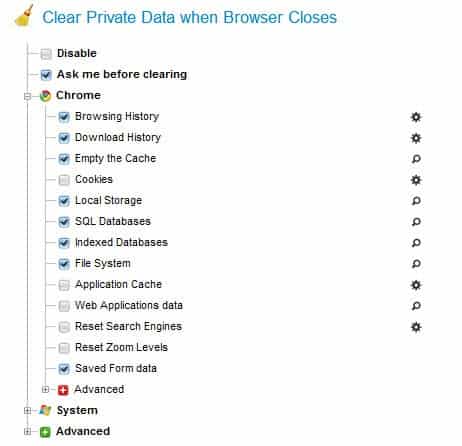
Here is the list of data that it can clean automatically when the browser window is closed:
- Browsing history
- Download history
- Browser cache
- Cookies
- Local Storage
- SQL databases
- Indexed databases
- File system
- Application cache
- Web applications data
- Reset search engines
- Reset zoom levels
- Saved form data
- Saves passwords
- Extensions cookies
- Extensions Local Storage
- Extensions SQL databases
- Extensions indexed databases
- Extensions file system
- Google Gears data
- Reset Chrome Local State
Plus the following that are not Chrome specific:
- Recycle Bin
- Temporary files
- Recently opened files
- Flash Local Shared Objects (LSO)
- Silverlight Cookies
- Java Cache
You can furthermore select to delete the data using secure overwrites to protect the data against file recovery attempts, configure Click&Clean to run an external application like CCleaner or Eraser, and whitelist cookies and site data to block the data from being deleted with the rest of the data.
It is not really clear why Google is not integrating an option to delete all browsing data on exit in the Chrome browser.
The Click&Clean extension for the browser makes more than up for it though, and it is recommended to anyone who wants that feature to be available in the browser.
- Add new comment
- Read more
- 1339 reads
- Feed: gHacks technology news
- Original article
Most Popular iOS Web Browser: Chrome

Putting aside the issue of Apple not allowing other browsers to bring their own engines to the table in iOS, there's more to a great browser than just its engine, and there are plenty of great browsers for the iPhone and iPad. Deciding which one is the best for you is a matter of taste, but we asked you last week which ones you thought were the best. Then we tallied your nominations and took a look at the top five iOS web browsers and put them to a vote. Now we're back to highlight the winner. More »
- Add new comment
- 728 reads
- Feed: Lifehacker: Google Chrome
Five Best iOS Web Browsers

Safari may be the default browser for iOS, but it's far from the only one. There are plenty of great web browsers for the iPhone and iPad, and depending on the features you want—whether it's third-party plugins or tab syncing with your desktop, you have options. Last week we looked at the five best Android browsers, and this week we're going to look at the five best for iOS. More »
- Add new comment
- 749 reads
- Feed: Lifehacker: Google Chrome
Benchmarks: IE9 vs. Firefox 13 vs. Google Chrome 20 vs. Opera 12 vs. Safari 5.1
Yes, we will finally post this. With a release of new web browser builds, including Chrome 20 and Firefox 13, guys at the TomsHardware have yet again dome a good job ad benchmarking all of them. Who will win? Check the results below to find out.
- Add new comment
- Read more
- 3733 reads
- Feed: Web Browsers News and Reviews
Five Best Android Web Browsers

There are dozens of great web browsers available for Android, depending on the features you're looking for. Whether it's syncing with your desktop, or super-speedy browsing, or support for flash navigation, you have options galore—some of them popular, others not so much. This week we're going to look at five of the best Android browsers, based on your nominations. More »
- Add new comment
- 954 reads
- Feed: Lifehacker: Google Chrome
June, 2012 Market Share: Firefox, Safari, Opera - Up; IE, Google Chrome - Down
Well, here is an interesting turn of events, a somewhat inverted market share data.
Instead of focusing on the user experience and eliminating the useless 2 year release cycle, IE team has decided to fire more ads instead. Certainly, even great ads have their limits and as shown above, Internet Explorer continues to lose its market share, down from 54.05% to 54.02% (0.03 point decrease).
After following IE’s trend ever since the release of the Google Chrome, Firefox has managed to take back some of its share and is now back slightly above the 20% mark, up from 19.71% to 20.06% (0.35 point increase). Is it a dead cat’s bounce or the beginning of a new trend?
All good things come to an end and as shown in the graph above, Google’s Chrome web browser growth is slowing down, at least for a little while. This time its market share has decreased by a 0.5 point, down from 19.58% to 19.08%.
After grinding lower for a couple of months, Safari is bouncing back, up from 4.62% to 4.73% (0.11 point increase).
Just like Safari, Opera has struggled to gain a significant momentum for quite some time now. However, last month its market share has increased by a 0.03 point, up from 1.57% to 1.60%.
- Add new comment
- Read more
- 4241 reads
- Feed: Web Browsers News and Reviews
Lifehacker Faceoff: The Best Web Browsers for iPhone and iPad

With the arrival of Chrome on iPhone and iPad, the browser wars for iOS have become a little more interesting. Here's a rundown of our favorites. More »
- Add new comment
- 857 reads
- Feed: Lifehacker: Google Chrome
- 1
- 2
- 3
- 4
- 5
- 6
- 7
- 8
- next ›
- last »